Control Your CS2 ServerDirectly from Discord
Stop alt-tabbing to clunky RCON tools. CS2 Server Bot lets you manage your Counter-Strike 2 game server with simple Discord commands your whole team can use.
Beautiful, Interactive Controls
A clean interface with buttons, dropdowns, and real-time server status - all within Discord.
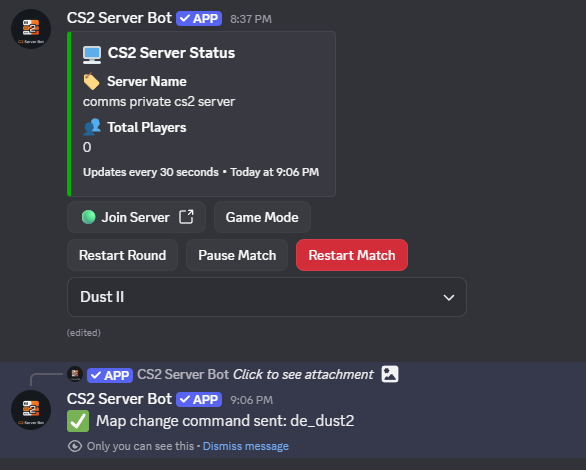
Click buttons, select maps
All from Discord
The Old Way vs. The Easy Way
No more fumbling with external tools. Manage your server where your team already is.
Traditional RCON Tools
The complicated way
- Alt-tab out of Discord
- Open a separate RCON tool
- Enter server IP and port
- Type the password
- Remember exact command syntax
- Hope you typed it right
Wastes time and breaks your focus. Easy to make typos with complex commands.
CS2 Server Bot
The easy way
- Open Discord
- Click a button or use dropdown
- Done!
Visual dropdowns and buttons. No commands to memorize. Your whole admin team can use it.
Powerful Server Controls, Dead Simple
Everything you need to manage your CS2 server, right from Discord. No command memorization required.
Map Dropdown
Instantly change maps with a dropdown selector. Includes popular maps like Cache, and always shows the current map for easy reference.
Game Mode Selector
Switch between game modes with a single click. Supports Casual, Competitive, Wingman, Deathmatch, Arms Race, and Demolition.
Restart Round
Quickly restart the current round when needed. Perfect for scrims and practice sessions.
Pause/Unpause Toggle
Pause and unpause the game with a toggle button. Essential for competitive matches and breaks.
Restart Match
Start fresh with a complete match restart. Resets scores and begins a new game.
Secure RCON
All commands are sent via RCON with ephemeral success/failure responses. Your server credentials stay safe.
Built-in Permission Controls
Only authorized members can control your server. Set up role-based permissions when you invite the bot.
Role-Based Access
When you invite the bot, you can configure which Discord roles have access to server controls.
Admin Only Controls
Restrict powerful commands to trusted admins. Prevent unauthorized users from making changes.
Secure by Default
The bot requests only the permissions it needs. Your server and Discord remain protected.
Easy Configuration
Set up permissions during the invite process. No complex configuration required.
How It Works
Add the Bot
Click "Add to Discord" to invite the bot to your server.
Configure Roles
During setup, configure which roles can access server controls.
Start Managing
Only members with the allowed roles will be able to use bot commands.
Control Your CS2 Server from Discord
Add CS2 Server Bot to your Discord server today. It's free, secure, and takes just seconds to set up.